Data Center HVAC Design Guide to Cooling Loads and Systems
A data center HVAC design guide: calculate the cooling load, choose air or liquid cooling, size the chiller plant and benchmark PUE.
Data center HVAC design is the cooling of IT equipment rather than people. Nearly all the power servers draw becomes heat, so the cooling load starts from the IT load. It then adds power system losses, lighting and people, and the plant is sized to remove all of it, around the clock, with backup.
That makes it a different job from an office. The load is denser, it never switches off, and the design limit is the air temperature at the server inlets rather than comfort. This guide covers how to calculate the load and how data centers are cooled. Then it works through the temperature limits, chillers, redundancy and PUE, with a worked example for an air-cooled hall.
Quick Answer: Data center HVAC design sizes cooling for IT equipment, which turns almost all its power into heat, all year. Calculate the load from the IT power plus losses, and choose air or liquid cooling by rack density. Keep server inlet air within ASHRAE’s 64.4 to 80.6 °F (18 to 27 °C), and add redundancy for the uptime the client needs.
What Is Data Center HVAC Design?
Data center HVAC design covers the systems that keep servers, storage and network equipment within safe temperatures. In a data hall, cooling is almost the whole job. The IT equipment gives off heat every hour of the year, and there’s rarely any heating load at all.
| Office | Data hall | |
|---|---|---|
| Design priority | Comfort and fresh air for the people in it | Server inlet air within ASHRAE’s recommended 64.4 to 80.6 °F (18 to 27 °C), and IT reliability |
| Main heat source | People, lighting, computers, sun and the building fabric | IT equipment: 88% of the load in this guide’s worked example |
| Hours of cooling | Mostly follows occupancy | Cooling must be available all 8,760 hours a year, though the plant’s output varies with load and weather |
| Load density | Much lower, varying with occupancy and equipment | About 250 to 300 W/ft² (2,700 to 3,200 W/m²) of IT power in a colocation hall, and far more with AI racks |
The colocation figure is from Southland Engineering, quoted by the 7×24 Exchange. AI racks go much further. A single GB200 NVL72 rack draws about 132 kW, so many new halls move to data center liquid cooling.
How Do You Calculate a Data Center Cooling Load?
Start from the IT load, because almost all of it becomes heat. Schneider Electric’s White Paper 25, “Calculating Total Cooling Requirements for Data Centers”, gives the standard method:
- IT equipment: take the total IT load power. It all becomes heat.
- UPS: add 0.04 × the UPS rating, plus 0.05 × the IT load. Leave any redundant UPS module out of the rating.
- Power distribution: add 0.01 × the UPS rating, plus 0.02 × the IT load.
- Lighting: add 1.33 W/ft² (14.32 W/m²) of floor area, the ANSI/ASHRAE 90.1-2016 lighting power density for computer rooms.
- People: add 341 Btu/h (100 W) for each person who works in the room at peak.
- Building: add heat through walls and roofs that face outdoors. A room inside an air-conditioned building can skip this step.
- Oversize: allow for humidification, redundancy and future growth.
White Paper 25 sets the humidification allowance from 0% for a small room with ducted return air, up to 30% for a room where hot and cold air mix freely. That’s because mixed rooms need colder supply air, which strips moisture out of the air that then has to be put back. It’s an allowance on the room cooling units’ capacity, not extra heat from the equipment.
These coefficients give an early-stage estimate. For detailed design, use the UPS maker’s heat loss data and the lighting actually installed.
Worked Example
This illustrative, early-stage estimate takes an air-cooled hall with 120 racks averaging 8.4 kW. That’s the mean rack density in Uptime Institute’s 2020 survey, so today’s racks often run denser. A 1,200 kW UPS serves them, not counting the redundant module. The white space is 4,000 ft² (372 m²), with four staff on shift.
| Item | Calculation | Heat, Btu/h | Heat, kW | Share |
|---|---|---|---|---|
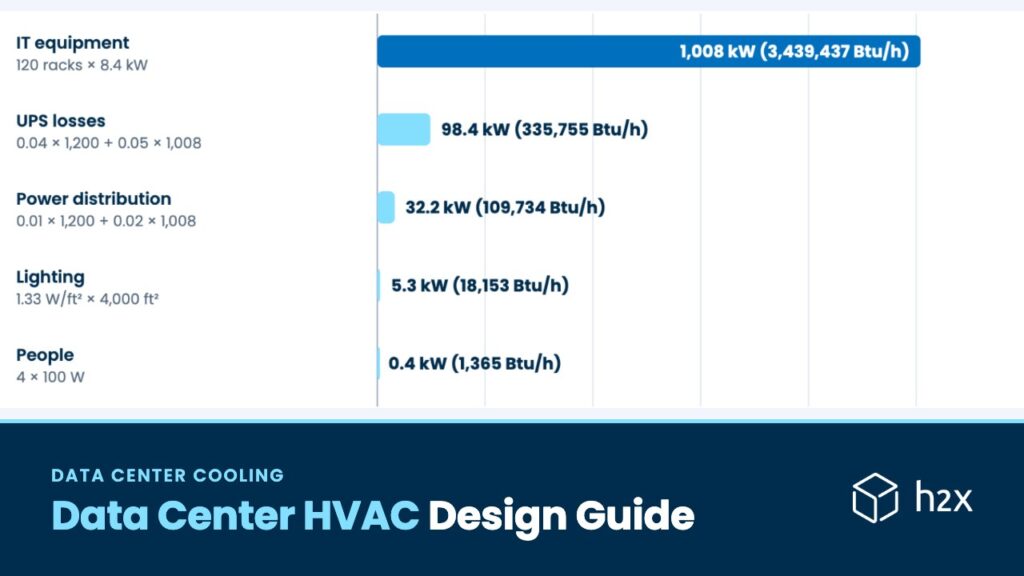
| IT equipment | 120 racks × 8.4 kW | 3,439,437 | 1,008.0 | 88.1% |
| UPS | 0.04 × 1,200 + 0.05 × 1,008 | 335,755 | 98.4 | 8.6% |
| Power distribution | 0.01 × 1,200 + 0.02 × 1,008 | 109,734 | 32.2 | 2.8% |
| Lighting | 1.33 W/ft² × 4,000 ft² | 18,153 | 5.3 | 0.5% |
| People | 4 × 100 W | 1,365 | 0.4 | Under 0.1% |
| Total | 3,904,444 | 1,144.3 |
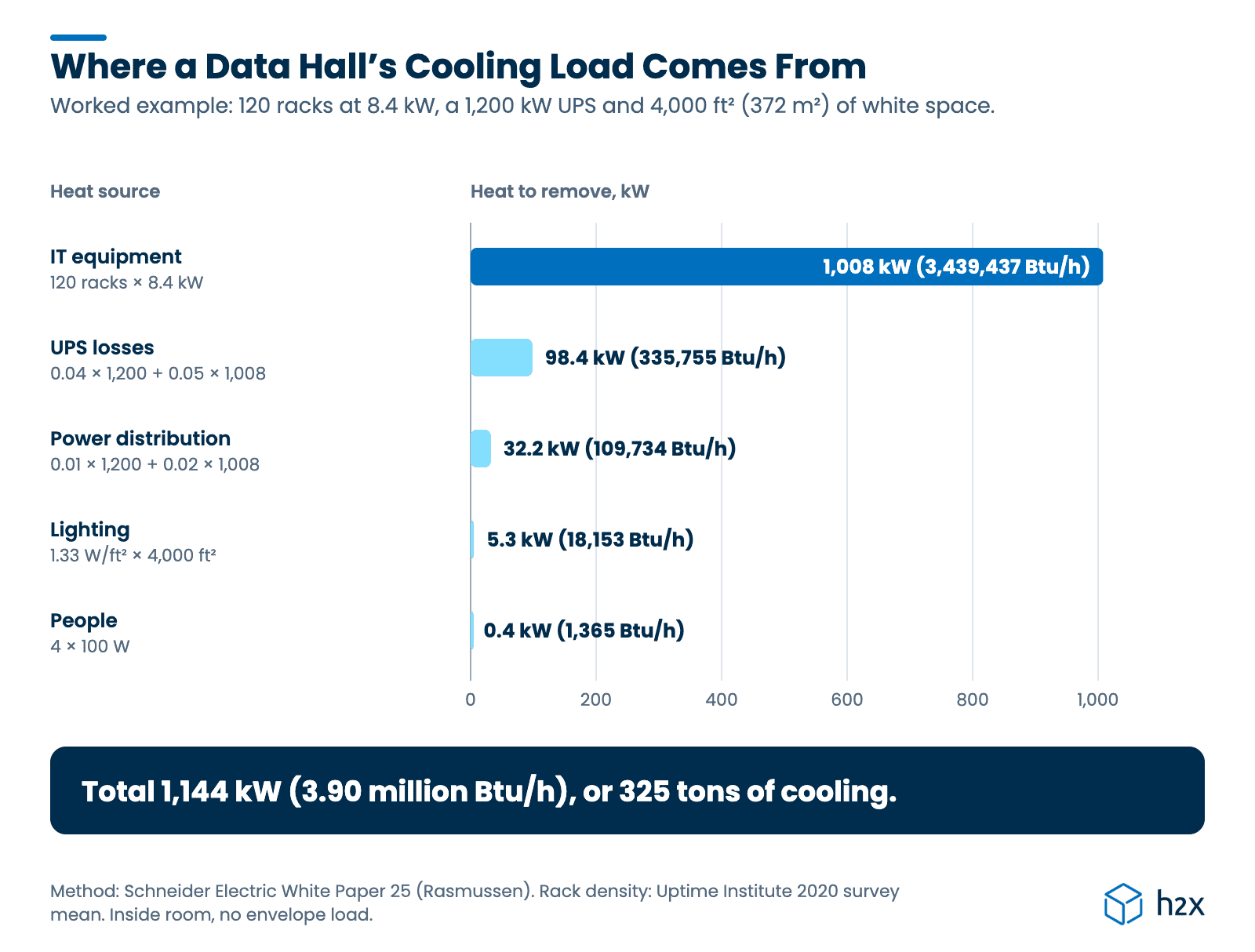
Across the whole facility, the cooling load is 3.90 million Btu/h (1,144 kW), or 325 tons, which is 1.14 times the IT load. The power system’s own losses add 13% on top of the IT equipment, which is why sizing from the IT load alone falls short. The UPS and distribution losses often sit in electrical rooms rather than the hall, but a shared chilled water plant still carries them.
The room cooling units in the hall itself carry 288 tons (1,014 kW): the IT, lighting and people. If the hall had high mixing, White Paper 25’s full 30% allowance would take that to about 375 tons (1,318 kW) of room unit capacity. That’s an allowance for those units, not an equal rise in the chiller load, and a well-contained hall needs far less.
How Much Airflow Does the Hall Need?
For an air-cooled hall, the room units must also move enough air: CFM = Btu/h ÷ (1.08 × ΔT) for standard air. The hall’s 3,458,955 Btu/h at a 20 °F (11.1 K) air temperature rise needs about 160,137 CFM (75.6 m³/s). In practice, containment, bypass air and fan heat all change the real figure.
The IT density works out at 252 W/ft² (2,713 W/m²), which sits inside the colocation range above. The hall is also inside the building, so there’s no envelope load to add.
Sizing the Data Center HVAC Plant for Redundancy
With 175-ton (615 kW) chillers, two units carry the 325-ton load. That’s N. For N+1, add a third, so any one chiller can fail or come out for maintenance while the other two carry the hall. The plant then has 525 tons installed for a 325-ton load, with 350 tons left if one unit is out.
This assumes each chiller delivers its 175 tons at the design conditions, not just at its nominal rating. Pumps, cooling units and cooling towers need the same redundancy, because a spare chiller alone doesn’t make a Tier II or Tier III plant.
How Are Data Centers Cooled?
Most data centers cool with air, delivered to the racks from units in the room, in the row or on the rack itself. The higher the rack density, the closer the cooling has to get to the IT equipment.
- Room-based: perimeter units push cold air across the room, often under a raised floor. A CRAC (computer room air conditioner) cools with its own refrigerant circuit. A CRAH (computer room air handler) has a chilled water coil fed from a central plant.
- Row-based: in-row units sit between the racks, which shortens the air path and cuts fan energy.
- Rack-based: a rear door heat exchanger swaps the rack’s rear panel for a water coil, so the heat never reaches the room.
- Direct-to-chip: cold plates on the processors carry most of the heat away in liquid.
According to Vertiv, air alone becomes impractical beyond roughly 20 kW per rack, and rear door coils can handle racks of 20 to 80 kW. At higher densities, direct-to-chip cooling becomes increasingly common, particularly for AI servers. Our guide to data center liquid cooling covers how those loops are sized.
Whichever method you choose, keep the hot and cold air apart. Containing the hot aisle or the cold aisle stops exhaust air finding its way back to the server inlets. Then the supply air can run warmer, and the plant does less work.
Data Center HVAC Temperature and Humidity Limits
The design target is the air entering the servers, not the room average. ASHRAE TC 9.9’s Thermal Guidelines, 5th edition (2021), recommend 64.4 to 80.6 °F (18 to 27 °C) dry bulb for its air-cooled classes A1 to A4.
The recommended moisture range runs from a dew point of 15.8 °F (−9 °C) up to 59 °F (15 °C). The relative humidity limit is 70%, or 50% where the air carries corrosive gases.
For equipment its maker classes as H1, ASHRAE’s high-density class, the recommended range tightens to 64.4 to 71.6 °F (18 to 22 °C). Running supply air near the top of the allowed range pays off. Every degree warmer gives the plant more hours when outdoor air or water can cool without a compressor.
Data Center Chillers, Economizers and Heat Rejection
For example, large halls usually run CRAHs or fan walls on chilled water from a central chiller plant. The chillers reject heat outdoors through cooling towers, dry coolers or their own air-cooled condensers. An economizer lets cool outdoor air or water do the work whenever the weather allows, so the compressors only run on warmer days.
How close each type of plant gets to the outdoor temperature sets how much free cooling you get:
| Heat rejection | Typical approach to outdoor conditions | Water use |
|---|---|---|
| Open cooling tower | Common practice doesn’t design below a 5 °F (2.8 K) approach to wet bulb, and sizing often starts at 10 °F (5.6 K) | Evaporates water |
| Closed-circuit cooler | Evapco rates its units at 95 °F (35 °C) entering water, 85 °F (29.4 °C) leaving water and 78 °F (25.6 °C) wet bulb, a 7 °F (3.9 K) approach | Evaporates water |
| Dry cooler | About 9 °F (5 K) above the dry bulb, per Airedale, varying with the selection | Almost none |
Lawrence Berkeley National Laboratory’s 2024 report notes that air-cooled chillers use no water but more energy. Dry coolers, though, can cool very efficiently without a compressor whenever the weather allows. So the balance between water and energy is central to sites where water is scarce.
The chilled water network then shares the plant’s capacity out across the CRAHs and coils. Each section is sized like any hydronic piping design, from each section’s load, temperature difference and velocity limits.
Data Center HVAC Redundancy and Uptime Tiers
Redundancy is set by how much downtime the client can accept, usually through Uptime Institute’s Tier levels:
| Tier | What it means for cooling |
|---|---|
| Tier I | Basic capacity, with no redundant components |
| Tier II | Redundant capacity components, such as an N+1 chiller, on a single distribution path |
| Tier III | Concurrently maintainable: redundant distribution paths, so any part can be serviced with the hall running |
| Tier IV | Fault tolerant, and the only Tier that requires continuous cooling through a power failure |
Uptime also recommends continuous cooling for any room above 4 kW per rack, regardless of Tier. At those densities, the temperature climbs fast if the cooling stops while the generators start. So many designs put fans, pumps and controls on UPS.
PUE and WUE
Power usage effectiveness (PUE) is the total facility energy divided by the IT energy. A PUE of 1.52 means that for every 100 kWh reaching the IT equipment, another 52 kWh goes on cooling, power losses and lighting.
| Benchmark | PUE |
|---|---|
| Theoretical floor | 1.00 |
| Google’s global fleet, 2025 | 1.09 |
| New builds, per Uptime Institute | 1.3 or better |
| Industry average, Uptime Institute 2026 survey | 1.52 |
| Typical server room, per LBNL | About 2.1 |
Still, Uptime’s 2026 average has barely moved in about seven years. Weighted by capacity, so that large sites count for more, it falls to 1.36.
For the worked example’s 1,008 kW of IT load, the IT equipment uses 8,830 MWh a year. At the 1.52 average, the overhead is 4,592 MWh. At 1.3, it’s 2,649 MWh: 1,943 MWh a year less, or an average of 222 kW. That assumes the IT load runs at 1,008 kW all year; real use varies with how busy the IT equipment is.
Water usage effectiveness (WUE), defined by The Green Grid, is the water a site uses per kWh of IT energy. However, it varies widely with climate and plant. LBNL puts the US average at just over 0.095 US gal (0.36 L) per kWh through 2023, and dry-cooled sites use almost none.
Choosing a Data Center HVAC Cooling Strategy
Four decisions set the design, and each one narrows the next:
| Decision | What sets it | What it decides |
|---|---|---|
| Rack density | The IT equipment the client is buying | Air, rear doors or direct-to-chip |
| Tier | How much downtime the client can accept | N, N+1 or 2N, and how many distribution paths |
| Climate | The site’s dry bulb and wet bulb temperatures, and its water supply | Towers, dry coolers or air-cooled chillers, and the economizer hours |
| Temperatures | ASHRAE’s inlet range, and the IT equipment’s water limits for liquid cooling | How warm the air and water can run, and so the PUE |
The site and the IT equipment are often chosen before the HVAC designer is appointed. So it’s worth asking about the rack density and the liquid cooling class early, because they decide most of what follows.
Common Data Center HVAC Design Mistakes
- Sizing from the IT load alone. In the worked example, losses, lighting and people add 14%.
- Counting the redundant UPS in the rating. White Paper 25 leaves it out, because it doesn’t carry the load.
- Forgetting humidification in a mixed room. It can call for up to 30% more room cooling unit capacity.
- Letting hot and cold air mix. The supply air then has to run colder, which costs energy and free cooling hours.
- Leaving out the envelope. A hall with walls or a roof facing outdoors also needs that heat added.
- Forgetting the air side in a liquid-cooled hall. Memory, network gear and electrical rooms still need air cooling.
How h2x Helps with Data Center HVAC Design
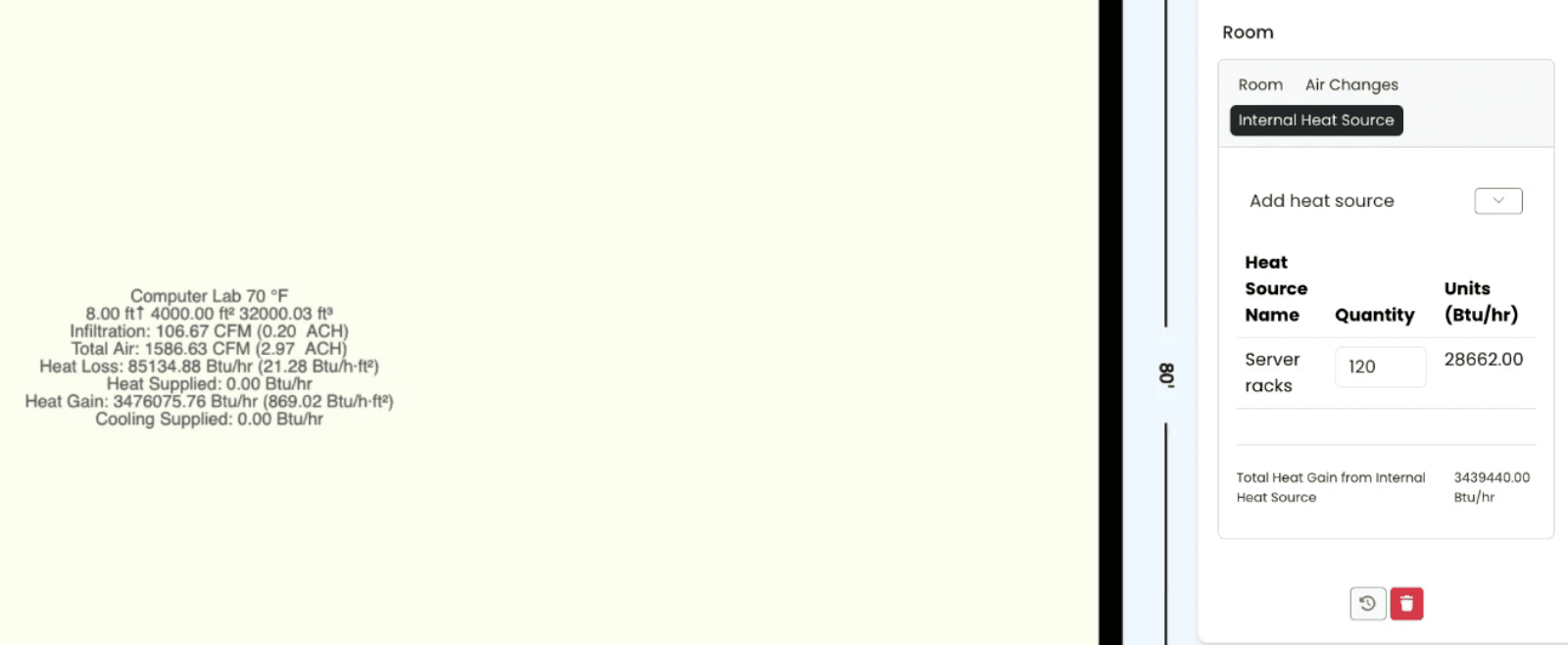
h2x engineering software calculates the cooling load for each room and sizes the chilled water pipework that serves it, in one model. In the heat load tool, server racks are an internal heat source. Set the heat per rack in Settings > Heat Load > Internal Heat Sources. Then add the rack count to each room, and h2x includes it in that room’s cooling load.
h2x’s heat load calculations using the Heat Balance Method are compliant with ANSI/ASHRAE/ACCA Standard 183. Additionally, the software’s heating and cooling water calculations are verified by CIBSE.
We set h2x up with the worked example’s 120 racks at 28,662 Btu/h (8.4 kW) each. It gives 3,439,440 Btu/h of internal heat gain, matching the IT line in the table above. The room’s total adds h2x’s own lighting, people and fabric gains, while the UPS and distribution losses would sit in the electrical rooms.
For the chilled water and facility water loops, h2x sizes each pipe with Darcy-Weisbach at the fluid temperature you set, within your velocity and pressure drop limits. Our liquid cooling guide shows h2x reproducing that post’s worked example: the same 5 in (125 mm) facility water main, at the same flow and velocity.
There’s more on h2x’s heat load calculations and chilled water design tools.
Key Takeaways
Data center HVAC design starts from the IT load and keeps server inlet air in range every hour of the year. The cooling method follows rack density, and redundancy follows the uptime the client needs.
- The load: IT power, plus UPS and distribution losses, lighting, people and any envelope gain. White Paper 25’s coefficients give the losses.
- The method: air for lower densities, rear door coils for higher ones, and often direct-to-chip for the most powerful AI racks.
- The limits: ASHRAE recommends 64.4 to 80.6 °F (18 to 27 °C) at the server inlet.
- Redundancy: N+1 for Tier II, redundant paths for Tier III, continuous cooling for Tier IV.
- Efficiency: the average PUE is 1.52, and new builds routinely reach 1.3 or better.
FAQ
How are data centers cooled?
Most data centers cool with air from CRAC or CRAH units in the room, in-row units between racks, or rear door heat exchangers on the racks. Hot and cold aisles are kept apart with containment. The densest racks, such as AI systems, often move to direct-to-chip liquid cooling.
How do you calculate a data center cooling load?
Start with the total IT load, since nearly all of it becomes heat. Add UPS losses (0.04 × UPS rating + 0.05 × IT load) and distribution losses (0.01 × rating + 0.02 × IT load). Then add lighting at 1.33 W/ft² (14.32 W/m²), 341 Btu/h (100 W) per person, and allowances for redundancy and growth.
What temperature should a data center be?
ASHRAE recommends server inlet air between 64.4 and 80.6 °F (18 and 27 °C) for its A1 to A4 equipment classes. The high-density H1 class narrows that to 64.4 to 71.6 °F (18 to 22 °C). The limit applies at the server inlets, not to the average room temperature.
What is a good PUE for a data center?
Uptime Institute’s 2026 survey puts the industry average at 1.52, and says new builds routinely reach 1.3 or better. Google’s fleet averaged 1.09 in 2025. A PUE of 1.3 means 30 kWh of overhead for every 100 kWh the IT equipment uses.
Do data centers need chillers?
Not always, but most large sites do, and economizers let them run without compressors for much of the year. Chilled water plants serve CRAHs and coils, and towers or dry coolers reject the heat. Sites with warm-water liquid cooling and cool climates can run their chip loops on dry coolers alone.
What is N+1 cooling redundancy?
N is the number of units needed to carry the full load. N+1 adds one spare, so any single unit can fail or be serviced without losing capacity. In this guide’s example, two 175-ton chillers carry the 325-ton load, so N+1 means three chillers.
Calculate the Load and Size the Pipework in One Model
h2x calculates each room’s cooling load, including server racks, and sizes the chilled water pipework that serves it. Change a rack count or a temperature, and the loads and pipe sizes update together.
Meet the author

Daniel Mousdell
Daniel Mousdell is the Founding Marketer at h2x, where he creates technical content and resources for HVAC and MEP engineers. Outside of work, he runs LilWayneHQ.
Article published: October 21, 2026
Last updated: October 21, 2026