
How to Read a Psychrometric Chart (Without Losing Your Mind)
This psychrometric chart guide breaks down every property, process, and worked example in plain English.
If you’ve just started your career in HVAC or building services engineering, the psychrometric chart probably looks like a tangled mess of lines. Don’t worry. Once you understand how to read a psychrometric chart, it becomes one of the most powerful tools in your toolkit.
Quick Answer: How Do You Read a Psychrometric Chart?
To read a psychrometric chart, start with two known air properties, usually dry bulb temperature and relative humidity. Plot the dry bulb temperature on the bottom axis, follow the second property line until the two values intersect, then read the remaining properties from that point, including humidity ratio, wet bulb temperature, dew point, enthalpy, and specific volume. The full step-by-step process, worked examples, and HVAC process diagrams are covered below.
What Is a Psychrometric Chart?
A psychrometric chart is a graphical representation of the thermodynamic properties of moist air. As such, it lets you quickly identify relationships between temperature, humidity, enthalpy, and other air properties without crunching equations.
You’ll use it for sizing HVAC systems, designing ventilation, coil processes analysis, understanding comfort conditions, and troubleshooting AHU performance.
Knowing how to read a psychrometric chart means you can do all of this without opening a spreadsheet.
Important Note: Most psychrometric charts are based on a specific barometric pressure, usually standard atmospheric pressure at sea level. If your project is at high altitude, air properties such as density, humidity ratio, and enthalpy will differ meaningfully from sea-level values. For accurate HVAC design work, make sure the chart or software you use matches the project location and pressure conditions.
The Seven Key Properties on the Psychrometric Chart
Before learning how to read a psychrometric chart, get familiar with these seven properties. Every line on the chart corresponds to one of them.
1. Dry Bulb Temperature (DBT)
- What it is: The “normal” air temperature you’d measure with a standard thermometer.
- Where it is on the chart: The horizontal axis (x-axis) along the bottom.
- Units: °C or °F.
- Think of it as: The temperature you feel when the air hits your skin, minus any evaporation effects.
2. Wet Bulb Temperature (WBT)
- What it is: The temperature measured by a thermometer wrapped in a wet cloth with air blowing over it. It accounts for evaporative cooling.
- Where is it on the chart: Diagonal lines sloping down from left to right, originating from the saturation curve.
- Why it matters: It’s essential for cooling tower design and understanding how much cooling potential the air has through evaporation.
3. Relative Humidity (RH)
- What it is: The percentage of moisture the air is currently holding compared to the maximum it could hold at that temperature.
- Where it is on the chart: The curved lines sweeping from the lower left to the upper right. The outermost curve (the saturation curve) is 100% RH.
- Note: RH is relative to temperature. 50% RH at 20°C (68°F) and 50% RH at 35°C (95°F) represent very different amounts of actual moisture.
4. Humidity Ratio (Moisture Content)
- What it is: The actual mass of water vapor per kilogram of dry air. grains/lb (imperial) or g/kg (metric);
1 g/kg ≈ 7 grains/lb. - Where it is on the chart: The vertical axis (y-axis) on the right-hand side.
- Why it matters: Unlike RH, this tells you the absolute amount of moisture in the air. It doesn’t change with temperature alone, only when you add or remove moisture.
5. Enthalpy
- What it is: The total heat energy in the air (sensible + latent). BTU/lb of dry air (imperial) or kJ/kg (metric);
1 kJ/kg ≈ 0.43 BTU/lb. - Where it is on the chart: Diagonal lines running from the upper left to the lower right, usually along the same angle as wet bulb lines (but read from a separate scale on the edge of the chart).
- Why it matters: This is how you calculate heating and cooling loads. The difference in enthalpy between two air states tells you how much energy your coil needs to add or remove.
6. Dew Point Temperature
- What it is: The temperature at which the air becomes fully saturated and water starts to condense out.
- Where it is on the chart: Find your air state, draw a horizontal line to the left until it hits the saturation curve (100% RH line). The dry bulb temperature at that intersection is the dew point.
- Practical use: If a surface is below the dew point of the surrounding air, you’ll get condensation. This is critical for duct insulation, chilled water pipes, and glazing design.
7. Specific Volume
- What it is: The volume occupied per unit mass of dry air. ft³/lb (imperial) or m³/kg (metric).
- Where it is on the chart: Steep, nearly vertical lines running from the lower left to the upper right.
- Why it matters: You need this to convert between mass flow rates (kg/s or lb/min) and volumetric flow rates (m³/s or CFM) when sizing ductwork and selecting fans.
How to Read a Psychrometric Chart: Step by Step
Finding the properties of an air state is straightforward once you know the steps.
First, you need to know at least two properties to find a unique point on the psychrometric chart. The most common pair of properties is dry bulb temperature and relative humidity.
How to Plot an Air State Step by Step:
- Start with dry bulb temperature first. Find your value on the horizontal axis and draw a vertical line upward.
- Next, find your second property. If it’s RH, follow the appropriate curved line. If it’s wet bulb, follow the diagonal. If it’s humidity ratio, draw a horizontal line from the right-hand axis.
- Then mark the intersection. That’s your air state.
- Finally, read off everything else. From that single point, trace lines to find enthalpy, dew point, specific volume, wet bulb, and all other remaining properties.
How to Read a Psychrometric Chart Example:
Say you have air at 77°F (25°C) DBT and 50% RH:
- First, go to 77°F (25°C) on the bottom axis, draw a vertical line up.
- Next, follow the 50% RH curve until it crosses your vertical line.
- Mark that point.
- Then read across to the right axis → humidity ratio ≈ 70 grains/lb (10 g/kg).
- Draw a horizontal line left to the saturation curve → dew point ≈ 57°F (14°C).
- Finally, read the diagonal lines through your point → wet bulb ≈ 64°F (18°C), enthalpy ≈ 21.5 BTU/lb (50 kJ/kg).
Common HVAC Processes on a Psychrometric Chart
Once you know how to read a psychrometric chart, every HVAC process shows up as a line or path between two air states. Below, find five of the most common processes.
Sensible Heating
- What happens: Air temperature increases, but moisture stays the same.
- On the chart: A horizontal line moving to the right.
- Example: Air passing over a hot water coil with no moisture added.
Sensible Cooling
- What happens: Air temperature decreases, but moisture stays the same (as long as you stay above the dew point).
- On the chart: A horizontal line moving to the left.
- Example: A cooling coil that doesn’t dehumidify.
Cooling and Dehumidification
- What happens: Air is cooled below its dew point, so both temperature and moisture content drop.
- On the chart: A line moving down and to the left, typically towards the saturation curve.
- Example: Air passing over a chilled water coil in summer. This is the most common cooling process in HVAC.
Humidification
- What happens: Moisture is added to the air.
- On the chart: The path depends on the method:
- Steam humidification moves almost straight up (adds moisture without changing DBT much).
- Evaporative cooling (adiabatic) follows a wet bulb line down and to the left (adds moisture while dropping temperature).
Mixing of Two Air Streams
- What happens: Two air streams at different conditions combine (e.g., outdoor air and return air).
- On the chart: A straight line between the two states. The mixed point sits closer to whichever stream has the larger flow rate.
Psychrometric Chart Worked Example: AHU Cooling and Dehumidification
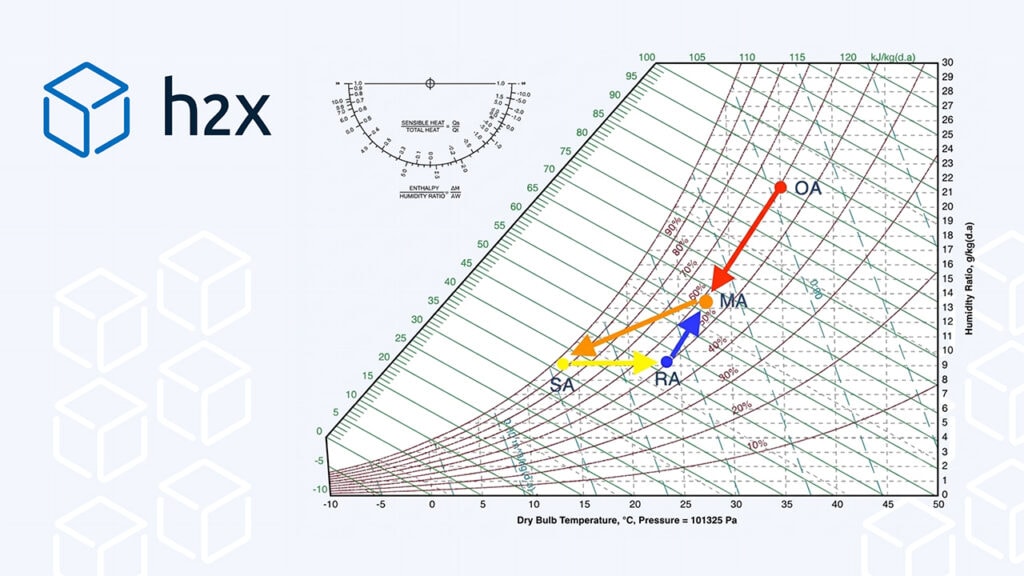
Next, let’s walk through a realistic summer cooling scenario for a typical Air Handling Unit (AHU). To trace this, we’ll plot four key air states — outside air, return air, mixed air, and supply air — and see how they connect on the chart.
The Scenario
In this example, you’re designing an AHU for a small office building in a warm, humid climate. Following from this, your design conditions are:
| Air State | Dry Bulb °F (°C) | Relative Humidity | Source |
|---|---|---|---|
| Outside Air (OA) | 95 (35) | 60% | Weather design data |
| Return Air (RA) | 75.2 (24) | 50% | Room setpoint |
| Mixed Air (MA) | 81.1 (27.3) | ~54% | Calculated from mixing |
| Supply Air (SA) | 55.4 (13) | ~95% | Off the cooling coil |
The AHU is configured for 30% outdoor air and 70% return air by mass flow (a typical minimum ventilation ratio in line with ASHRAE Standard 62.1 requirements).
Step 1 — Plot the Outside Air (OA)
First, find 95°F (35°C) on the bottom axis, follow the 60% RH curve to the intersection, and mark it as Point OA. Read off: humidity ratio ≈ 150 grains/lb (21.5 g/kg), enthalpy ≈ 38.7 BTU/lb (90 kJ/kg). This is the hot, humid air your system has to manage.
Step 2 — Plot the Return Air (RA)
Next, find 75.2°F (24°C), follow the 50% RH curve, and mark as Point RA. Read off: humidity ratio ≈ 65 grains/lb (9.3 g/kg), enthalpy ≈ 20.6 BTU/lb (48 kJ/kg). This is the comfortable room air coming back from the occupied space.
Step 3 — Find the Mixed Air (MA)
The outside air and return air combine before hitting the cooling coil. To trace this, draw a straight line between OA and RA. Since the mix is 30% OA / 70% RA, the mixed point sits 70% of the way from OA toward RA. Mark as Point MA.
Verify by calculation:
- Mixed DBT =
(0.30 × 35) + (0.70 × 24) = 81.1°F (27.3°C) - Mixed humidity ratio =
(0.30 × 21.5) + (0.70 × 9.3) = 91 grains/lb (13.0 g/kg)
Plot 81.1°F (27.3°C) / 91 grains/lb (13.0 g/kg) — it should land right on the OA–RA line. Read off: enthalpy ≈ 25.8 BTU/lb (60 kJ/kg). This is what your cooling coil actually has to process.
Step 4 — Plot the Supply Air (SA)
The cooling coil cools and dehumidifies the mixed air. Find 55.4°F (13°C) on the bottom axis and follow the 95% RH curve (air comes off a coil near saturation). Mark as Point SA. Read off: humidity ratio ≈ 62 grains/lb (8.8 g/kg), enthalpy ≈ 15.1 BTU/lb (35 kJ/kg). The air has been stripped from 91 to 62 grains/lb (13.0 to 8.8 g/kg) — that’s the dehumidification your space needs.
Step 5 — Connect the Dots
Now, draw process lines between your points:
- OA → MA ← RA — The mixing lines. A straight line between OA and RA, with MA on it at the 30/70 ratio.
- MA → SA — Cooling and dehumidification. Slopes down and to the left toward the saturation curve — this is what happens across the cooling coil.
- SA → RA — The room process. Supply air picks up sensible heat (people, lights, equipment) and latent heat (moisture from occupants), gradually warming and humidifying back to room conditions.
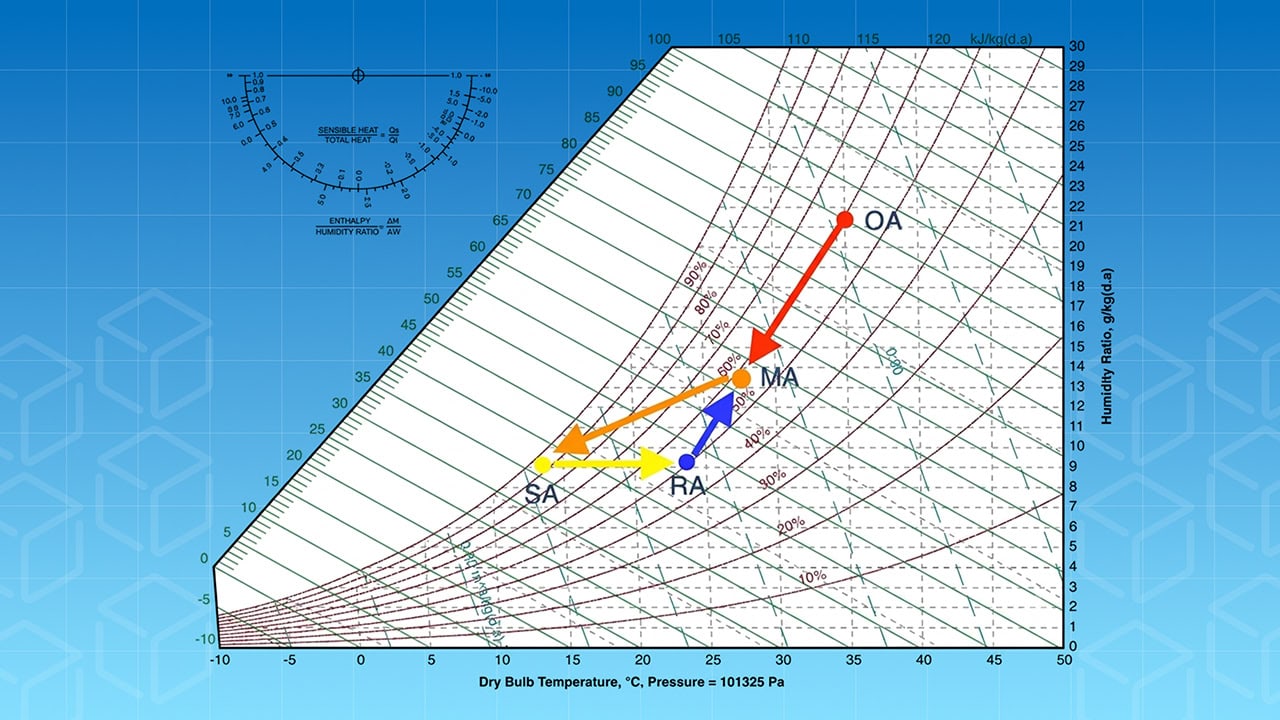
The four air states plotted on the psychrometric chart: OA (outside air), MA (mixed air), RA (return air), and SA (supply air). Arrows show the mixing, cooling, dehumidification, and room processes.
What You Can Calculate from This
With four points plotted, you can extract the following data:
- Cooling coil load =
ṁ × (h_MA − h_SA). Imperial:ṁ × (25.8 − 15.1) = ṁ × 10.7 BTU/lb. Metric:ṁ × (60 − 35) = ṁ × 25 kJ/kg. - Moisture removed by the coil =
91 − 62 = 29 grains/lb (4.2 g/kg) of dry air. - Room sensible heat ratio (SHR) = slope of SA → RA line. Steeper = more latent load.
- Outside air load =
(h_OA − h_RA) × OA mass flow rate— the energy cost of ventilation.
The Big Picture
Finally, when you look at all four points on the chart, the entire AHU air cycle is visible at a glance — OA in the hot, humid upper-right; RA in the comfortable middle zone; MA on the line between them; and SA in the cool, near-saturated lower-left, where the coil has done the heavy lifting.
If any of these points shift (hotter day, higher occupancy, different ventilation rate), you can immediately see the knock-on effects across the whole system.
Tips for Junior Engineers
- Always label your points. Label each state (Point A = outside air, Point B = off-coil, etc.). It makes your work reviewable and catches mistakes.
- Use software, but understand the psychrometric chart first. Spreadsheets and software are great for speed, but you won’t catch their errors if you can’t read the chart yourself. Understanding the theory allows you to understand the results coming from the software.
- The saturation curve is your boundary. Air states cannot exist above the 100% RH curve as unsaturated air. If a calculated point lands beyond the saturation curve, it usually means condensation has occurred or one of your input values is incorrect.
- Enthalpy difference = energy. Enthalpy difference between entering and leaving air × mass flow rate = coil load. This is the single most useful calculation you’ll do with the psychrometric chart.
- Dew point matters for condensation risk. Any surface below the air’s dew point will sweat. Check chilled water pipes, cold ducts, and windows to prevent condensation.
How to Read a Psychrometric Chart: Quick Reference Cheat Sheet
| Property | Imperial Units | Metric Units | Axis / Line Type |
|---|---|---|---|
| Dry Bulb Temp | °F | °C | Horizontal axis (bottom) |
| Humidity Ratio | grains/lb | g/kg | Vertical axis (right side) |
| Relative Humidity | % | % | Curved lines |
| Wet Bulb Temp | °F | °C | Diagonal lines from the saturation curve |
| Enthalpy | BTU/lb | kJ/kg | Diagonal scale (chart edge) |
| Dew Point | °F | °C | Horizontal line to saturation curve |
| Specific Volume | ft³/lb | m³/kg | Steep lines |
Conclusion
Knowing how to read a psychrometric chart looks intimidating at first, until it clicks. Then you’ll wonder how you ever worked without it.
To learn where each property lives, try plotting a few states by hand, and trace through the AHU example above. Once it becomes second nature, you’ll be sanity-checking equipment selections and holding your own in design reviews in no time.
Frequently Asked Questions: Psychrometric Chart
What is a psychrometric chart used for in HVAC?
A psychrometric chart is used to determine the thermodynamic properties of moist air at a given state, including dry bulb temperature, humidity ratio, enthalpy, wet bulb temperature, dew point, and specific volume. HVAC engineers use it to size cooling and heating coils, design AHU processes, calculate ventilation loads, and verify comfort conditions without solving equations manually.
How many properties do you need to read a psychrometric chart?
You need at least two independent air properties to locate a unique state point on a psychrometric chart. The most common pair is dry bulb temperature and relative humidity.
How do you find the dew point on a psychrometric chart?
Locate your air state on the chart, then draw a horizontal line to the left at constant humidity ratio until it intersects the saturation curve (100% RH line). The dry bulb temperature at that intersection is the dew point. Any surface in contact with air at a temperature below this value will experience condensation.
What does enthalpy mean on a psychrometric chart?
Enthalpy on a psychrometric chart represents the total heat energy in the air — the sum of sensible heat (related to temperature) and latent heat (related to moisture content). It is read from the diagonal scale at the chart edge and expressed in BTU/lb of dry air (imperial) or kJ/kg (metric). Specifically, the difference in enthalpy between two air states multiplied by mass flow rate gives the coil load.
What is the difference between wet bulb and dry bulb temperature?
Dry bulb temperature is standard air temperature measured with a conventional thermometer, unaffected by moisture. Wet bulb temperature is measured with a thermometer whose sensing element is kept moist; evaporation from the wet surface cools it below the dry bulb reading. The gap between the two indicates how much evaporative cooling potential the air has — a smaller gap means the air is already close to saturation. In other words, the closer the wet bulb is to the dry bulb, the less evaporative cooling capacity the air can offer.
Can you use a psychrometric chart for both metric and imperial units?
Yes, psychrometric charts are published in both unit systems. The structure is identical, only the scales change. For example, metric charts use °C for temperature, g/kg for humidity ratio, and kJ/kg for enthalpy. Whereas, imperial charts use °F, grains/lb, and BTU/lb respectively. The conversion factors are: 1 g/kg ≈ 7 grains/lb and 1 kJ/kg ≈ 0.43 BTU/lb.
Plot Psychrometric Processes Automatically in Your HVAC Design
h2x calculates air state properties and coil loads as part of your system design workflow. No manual chart reading required.
Meet the author

Jonathan Mousdell
Jonathan Mousdell is a Mechanical Engineer and co-founder of h2x, where he creates technical content and resources for MEP engineers.
Article published: June 25, 2026
Last updated: July 9, 2026
Loved by Engineers
You might also like:
 Latent Heat vs. Sensible Heat: What Every Mechanical Engineer Needs to Know
 Internal Heat Gain: A Practical Guide for HVAC & Building Services Engineers
 Ductulator Chart: Practical Guide for Mechanical Engineers (Free Download)
 Do Heat Pumps Work in Cold Weather? How They Extract Heat From Air Below 0°F